Hey Primebook,
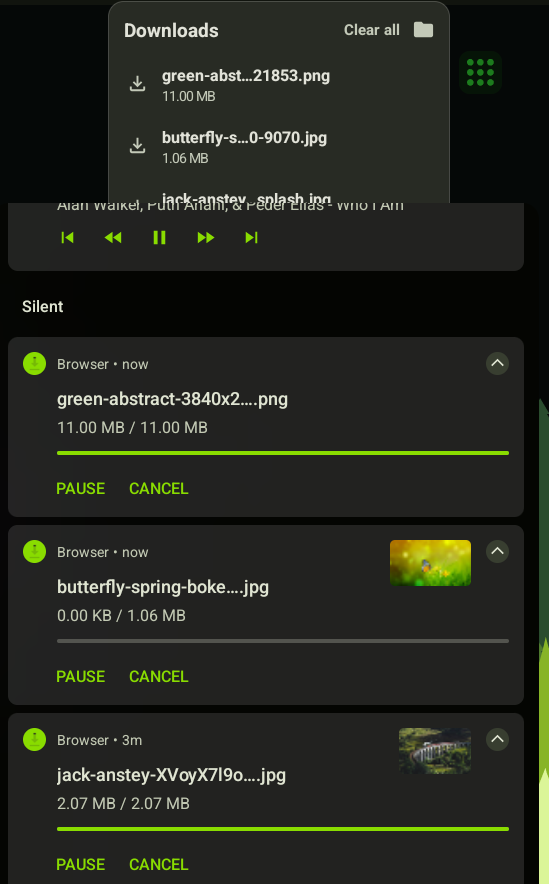
I want to share that after the update of browser, the Prime Browser behaves well, but a bug occurs: the files I download are repeatedly downloaded unnecessarily while using the browser.
example:i have downloaded pdfs they are downloaded till now but here the caught comes that these files are not really downloaded to device file manager.
NOTE: Also, the files which i downloaded in browser are not configuring with notifications.
so please check the issue and fix it.
please reply me @Primebook_Admin
Our team is working on this. As soon as we have an update, we’ll let you know!
Could you please confirm whether you’re deleting the image from the File Manager and then trying to open it from the browser flyout? Also, please share the website you’re using to download the files and capture a bug report so our team can investigate the issue further.
I’ll explain clearly that I recently used some websites for my studies, like Collegedunia. I have downloaded the pdf and later it has been downloading automatically further days and toggle in notification panel often. Other PDFs also but now i used some wallpaper downloading websites like 4k wallpapers here it does not configuring the downloading files with notification panel.the both issue occur with prime browser not with others.